

A hand-maintained service catalog starts going stale the moment someone saves it.
Why the wiki page always loses
We had the usual setup: one page listing our services, their owners and a few links. It was meant to be the single source of truth. In practice it depended on engineers remembering to update it after they’d already moved on to the next ticket. Nobody gets credit for editing a wiki table, so it drifted until people stopped trusting it.
The bigger problem was that the facts we cared about didn’t live on that page anyway. Deployments lived in the CI/CD tool. Coverage and quality gates lived in the code-quality scanner. Dashboards and alerts lived in the monitoring platform. Each tool was right about its own slice, and nothing joined them up. Answering “what state is this service in?” meant four browser tabs and a message to a colleague.
The pipeline already knows
The shift that made this work is simple. Every time a service deploys, the pipeline already holds most of what a catalog needs: which service, which environment, which build, which pipeline, who triggered it and when. The build output reveals the runtime version.
So instead of asking people to write those facts down, we collect them at deploy time. The few things a pipeline can’t infer, like the owning team, the domain, a one-line description and links to API docs and monitoring, are set once as pipeline parameters, next to the code. After that, every release refreshes the catalog as a side effect.
Documentation stops being a chore you do after shipping. It becomes something shipping produces. For anyone accountable for a large estate, that means questions about ownership, upgrade risk and quality get answered from data, not from whoever happens to remember.
How it fits together
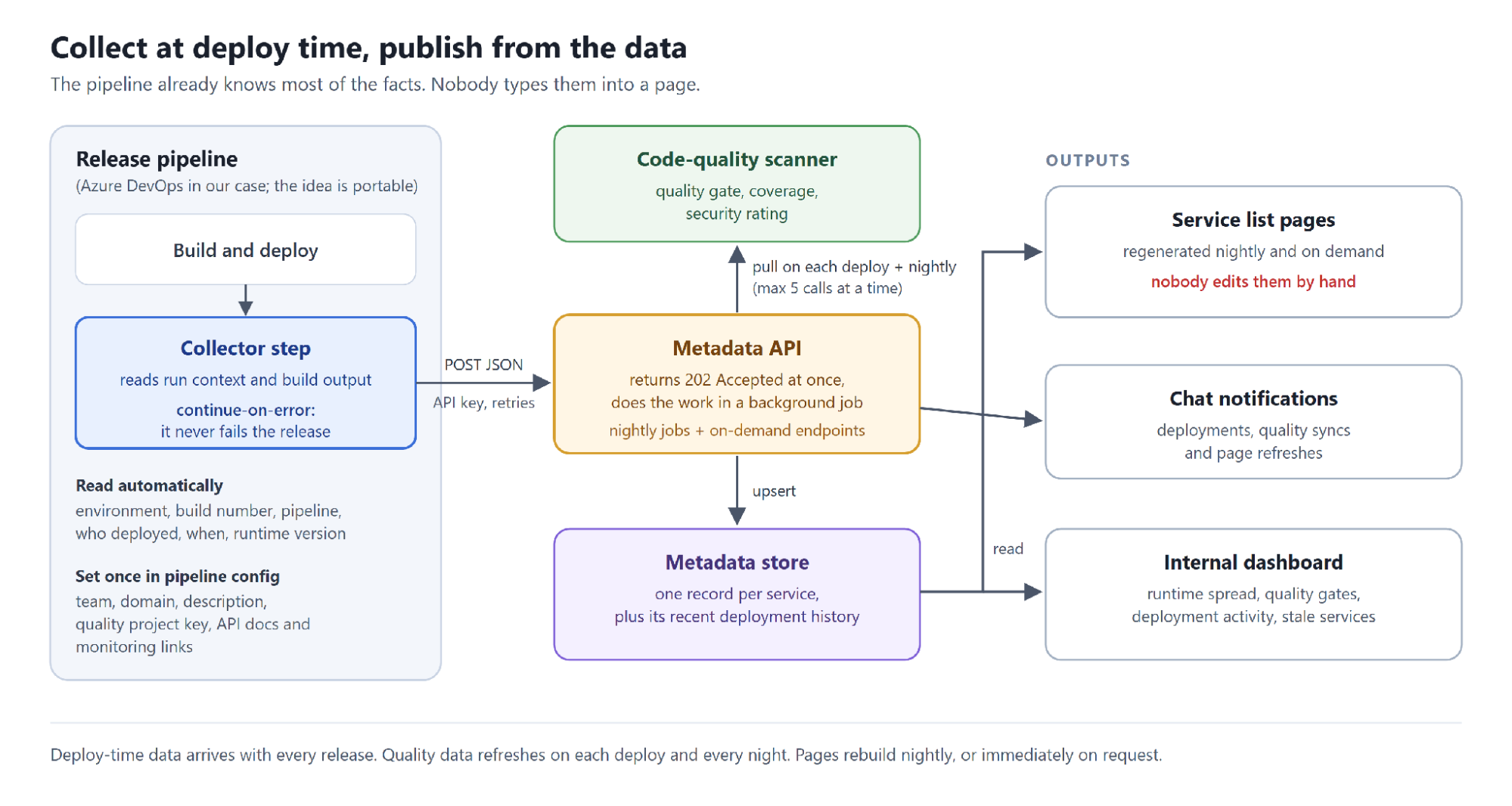
There are four moving parts:
- A collector step in the release pipeline. A short script reads the run context and the build output, works out the runtime version, and posts a JSON payload to the metadata API.
- The metadata API. It accepts the payload, queues a background job and returns straight away. The job upserts one record per service and adds the deployment to that service’s history.
- Enrichment. On each deployment, and again every night, the API pulls the quality-gate status, coverage and security rating from the code-quality scanner and attaches them to the record.
- Outputs. A nightly job regenerates the service list pages from the stored data. An internal dashboard reads the same store and shows runtime spread, quality-gate status, deployment activity and services that haven’t shipped in 30 days. A chat channel hears about deployments, quality syncs and page refreshes.
Our implementation targets Azure DevOps, covering both classic release pipelines (through a task group) and YAML pipelines (through a step template). The collector is a PowerShell script, the API is .NET, the store is a document database, and quality data comes from SonarCloud. The concept isn’t tied to any of that. GitHub Actions, GitLab CI and others expose the same kind of run context, so the pattern carries over, but the version we’ve built and run is the Azure DevOps one.
Here’s roughly what a team adds to a YAML pipeline (names changed):
- template: steps/push-service-metadata.yml
  parameters:
    ServiceName: order-service
    TeamName: team-checkout
    ServiceDomain: commerce
    Description: Accepts and tracks customer orders
    EnvironmentName: $(Environment)
    SonarProjectId: order-service
    SwaggerUrl: https://order-service.example.com/swagger
That’s the whole integration. In our shared deployment template it sits behind a single on/off flag.
Design decisions that got teams to say yes
Adoption mattered more than features. Most of these decisions came from one question: what would make a busy team refuse to add this?
It can’t fail a release. The collection step is marked continue-on-error. The script retries the API call a few times, then gives up, and the release carries on with a warning. A gap in the catalog is an inconvenience. A production release blocked by a catalog tool is a reason to rip the step out.
The API answers immediately. The endpoint returns 202 Accepted and does the real work in a background job, so a slow third-party API never adds minutes to a deploy.
Pages are generated, never edited. The service list is rebuilt from data. If something on it is wrong, you fix the pipeline parameter, not the page. That rule is what keeps it trustworthy.
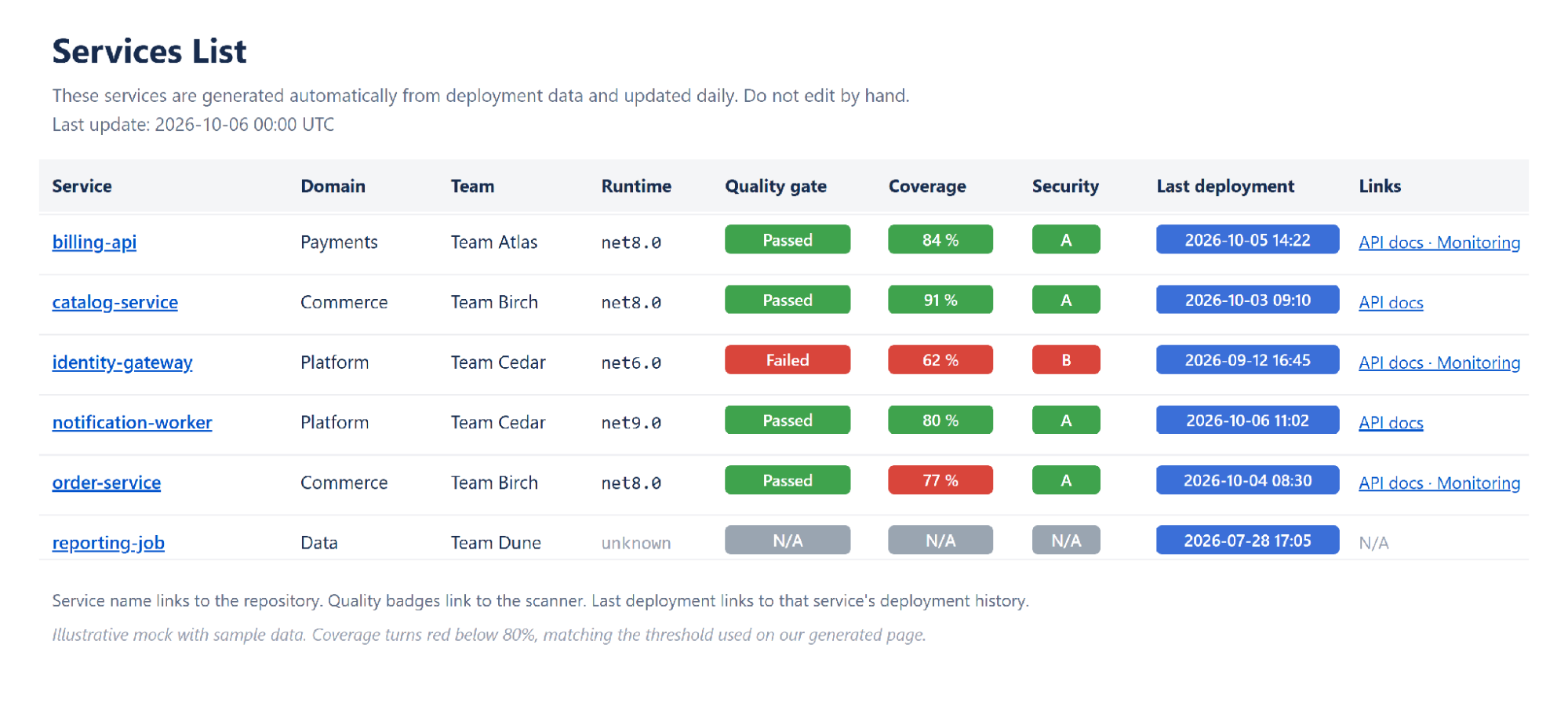
History lives with the service. Each record keeps its recent deployments: environment, build number, pipeline, who deployed and when. “What changed recently?” becomes a lookup instead of an investigation. For audit and compliance conversations, that’s a record of who deployed what, where and when that nobody had to reconstruct after the fact.
Keys are scoped. Pipelines authenticate with an API key in a request header. The read-only deployment-history endpoint has its own separate key, so being able to read history doesn’t let you write anything.
What was harder than we expected
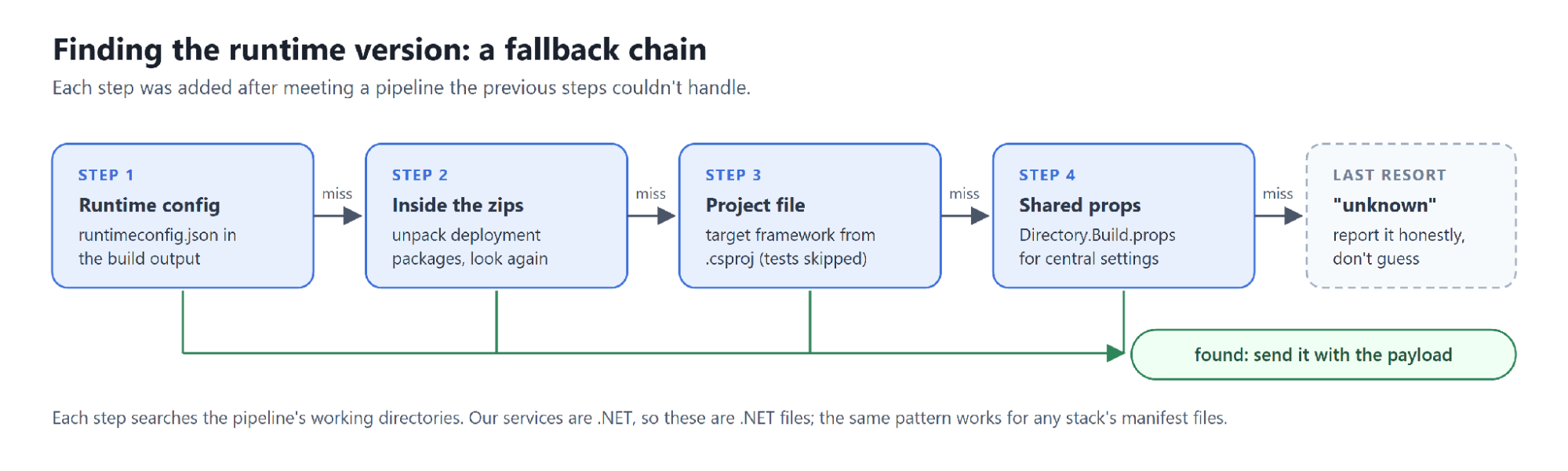
The runtime version hides somewhere different in every pipeline. The first version of the collector looked for one file. Then we met releases that only had a zipped package, repos that set the framework centrally, and a deploy task that names its artifact something nobody predicted. The script now works through a chain of fallbacks and reports “unknown” rather than guessing. Our commit history reads like a list of pipelines we hadn’t met yet. If you build this, budget for the long tail, not the happy path.
The wiki pushed back. Our first page used coloured badges for quality and coverage. It looked great, but the wiki’s chart and pivot macros can’t aggregate images, so nobody could chart “how many services on each runtime”. We now generate two pages from the same data: one with badges for people, and a plain-text one that filters and charts work on.
The catalog only knows about services that ship. Collection is opt-in per pipeline, and a service that never deploys never appears. Deprecated services that no longer ship simply weren’t there, so we added an endpoint to register them by hand. It’s the one manual path left, and it’s there on purpose.
What we’d revisit
Each service is a single record holding its last ten deployments. That was the right call to get started, and it’s enough to answer “when did this last ship?”. But “last deployment” means the latest deployment to any environment, and ten entries isn’t much history for trends. If we started again, we’d store deployments as separate events from day one and build the per-service view on top.
We’d also version the collector script. Pipelines download the latest copy at run time, which is great for rolling a fix out everywhere at once. It’s less great for exactly the same reason.
Where this goes next: AI on top of trusted data
The collector already runs across a mix of container apps, Service Fabric services, web front ends and App Services, and we’re rolling it out to the rest of our services. The goal is simple: every service in one place, and current.
Once the data can be trusted, more becomes possible. The idea we find most interesting is an AI assistant that answers questions like “which production services are still on an older runtime?” or “which services are below our coverage target?” from live data instead of a stale page. Deeper analytics over the deployment history, such as audit reports, is another. Neither exists today. Both depend on the part this project already solves: data that stays accurate without anyone maintaining it. AI is only as good as the data under it, and a catalog nobody trusts makes for an assistant nobody trusts either.
Do you need a developer portal instead?
Full developer portals do much more than this, and if you have a platform team to run one, they’re worth it. But a portal still needs accurate data, and in our experience keeping data true is the hard part of any catalog. Collecting at deploy time gets you that data now, with a few lines of pipeline config, and it can feed a portal later.
A checklist for your own setup
- List the questions people ask most often about a service, and collect only the data that answers them.
- Start with what your pipeline already knows. Ask teams to set the rest once, in pipeline config.
- Make sure the collection step can’t fail a release.
- Return fast from the API and do enrichment in the background.
- Generate catalog pages from data, and never edit them by hand.
- Store deployments as events from day one.
- Refresh quality signals on a schedule, with an on-demand option.
- Plan a deliberate path for services that rarely or never deploy.
None of this needs a new platform. It needs one step in the pipeline you already run, and the discipline to never edit the output by hand.